

The results of the Cost to serve experiment are available for one period only (defined in the experiment parameters). Based on the data provided in the scenario tables, the Cost to serve results:
- Provide statistics on all the expenses incurred while transferring the demanded product from its source to the final customer.
- Show how optimization changes the supply chain’s cost structure compared to the baseline.
- Validate input accuracy by revealing unexpected cost deviations.
- Highlight opportunities for price adjustments and discounts across the supply chain.
Experiment result with all the possible combinations is available in the Iterations panel.
All the details on each iteration are available in the dashboard below the experiment's view in the form of statistics distributed through the pages on the left (each page refers to a certain type of statistics). If required, you can rename, remove a page, or export the content of the page's statistics to an MS Excel file.
To see experiment results
- Run the experiment.
-
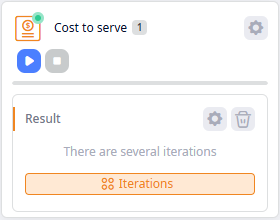
Once the experiment is completed, a new Result item will be created below the Cost to serve tile.
-
Click Result to analyze the results.
Cost to serve results data cannot be edited unless you convert it to a scenario.
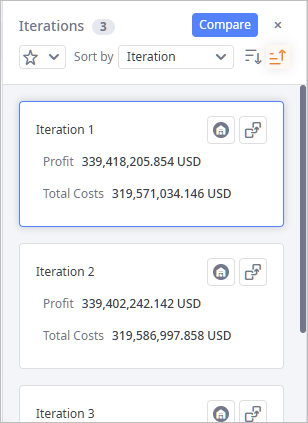
The Iterations panel contains iterations of the selected result. The basic data of each iteration is shown on an iteration card. The top card contains iteration with the best result in terms of profit.
Click the required iteration card to display the supply chain from that card on the map.
To hide / show the Iterations panel
-
Click the
 Iterations control on the currently selected output item to toggle the panel's visibility.
The panel contains:
- Controls — use controls to manage iteration cards.
- Iteration cards — one card per iteration a result contains. Cards contain a set of KPI metrics to instantly observe the efficiency of the supply chain within a specific result iteration.
Iteration controls
The header of the Iterations panel comprises:
- Iterations — the title of the panel with the number of iterations this result contains.
-
 — [available only in the anyLogistix Professional and anyLogistix Professional Server editions]
opens the Iterations Comparison dialog box, which allows you to compare iterations of this result.
— [available only in the anyLogistix Professional and anyLogistix Professional Server editions]
opens the Iterations Comparison dialog box, which allows you to compare iterations of this result.
-
 — closes the Iterations panel (you can open it later).
-
 — opens the drop-down list of KPI metrics that can be added to the iteration cards.
-
Sort by — the sorting type of iteration cards.
By default the cards are sorted by the iteration name (it contains the ordinal number).
The statistics, by which the sorting is done, is highlighted within the card and is placed at the top.

-
 — select to reorder the sorted cards in the descending order.
-
 — [selected by default] reorders the sorted cards in the ascending order.
Iteration cards
Iteration cards contain a set of KPI metrics to instantly observe the efficiency of the supply chain within a specific result iteration. The content of iteration cards is user-defined.
The iteration card comprises:
- Title — iteration name with its ordinal number.
-
 — shows the list of facilities in this iteration.
-
 — opens the
Convert Result dialog box, which allows you to convert the current iteration into a new scenario.
— opens the
Convert Result dialog box, which allows you to convert the current iteration into a new scenario.
- The list of user-defined KPI metrics.
List of facilities in this iteration
The drop-down list shows the inclusion type that was assigned to the facilities by the experiment within this iteration.
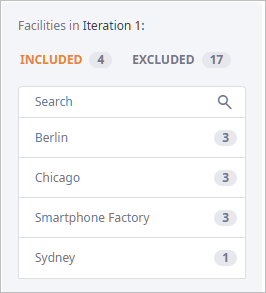
The drop-down list comprises:
- Title — iteration name with its ordinal number.
-
Tabs with indication of the number of facilities it contains:
- Included — the facilities that are included in the solution offered in this iteration. The number next to the tab name shows the quantity of included facilities.
- Excluded — other facilities that are excluded from the solution offered in this iteration. The number next to the tab name shows the quantity of excluded facilities.
- Search — use the search field to filter the list of facilities.
- Facilities. Each facility item comprises the name of the facility and the number of iterations (that are added to the comparison table) containing this facility.
- All — this page contains all the predefined experiment's statistics in one place.
- Cost to Serve — shows detailed statistics on all the costs incurred while transporting products from their sources to the final destination.
- Cost to Serve Light — shows statistics on the basic costs incurred while transporting products.
- Cost to Serve by Product — shows statistics on the costs (aggregated by product) incurred while transporting products from their sources to the final destination.
- Cost to Serve by Destination — shows statistics on the costs (aggregated by customer) incurred while transporting products from their sources to the final destination.
- Aggregated Values — shows aggregated values (total expenses, revenue) that are relevant within the specified experiment duration period.
- Product Flows — shows detailed statistics on all the flows of the supply chain within the specified period of time.
- Storage by Product — shows aggregated values (total expenses, revenue) that are relevant within the specified period of time.
- Production Flows — shows detailed statistics on the flows involved in the production process.
- Production Cost — shows detailed statistics on costs incurred during the production process.
- Demand Fulfillment — shows detailed statistics on demand within the supply chain during the specified period of time.
-
How can we improve this article?
-